Introduction
Brewer spectrophotometers track the Sun or Moon, and use a spectrometer combined with a photo-multiplier tube to take high-precision measurements of the intensity of ultraviolet light reaching the Earth’s surface. These measurements are taken at the absorption wavelengths of ozone, which allows the total amount of stratospheric ozone in a column between the instrument and the Sun to be calculated. Measurements made at this station are part of a worldwide network of 200+ currently operational Brewers in 40 different countries. Alert is the northernmost location in this network, while the Amundsen-Scott station at the South Pole is the southernmost. The data from these instruments are collected and analyzed to create a model of the Earth’s stratospheric ozone cover. This SOP is written for the Environment Climate Change Canada’s Canadian Brewer spectrophotometer Network which consists of 37 Single and Double spectrometer instruments at 10 sites across the globe. This document was created for the site operators to reference for installation and removal of the Brewer instrument. For questions on any parts of the SOP, please contact Reno Sit (reno.sit@ec.gc.ca) or Andrew Hall (andrew.hall@ec.gc.ca).
Procedure
Brewer installation
- Release the four latches on the Brewer Travel Case and lift it off.
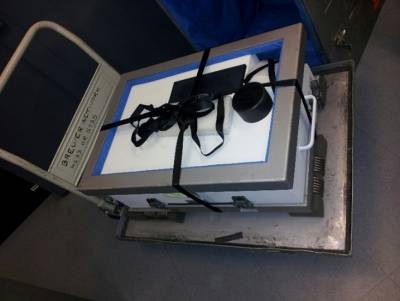 Release the tie down straps and remove the metal collar and foam from the top of the brewer.
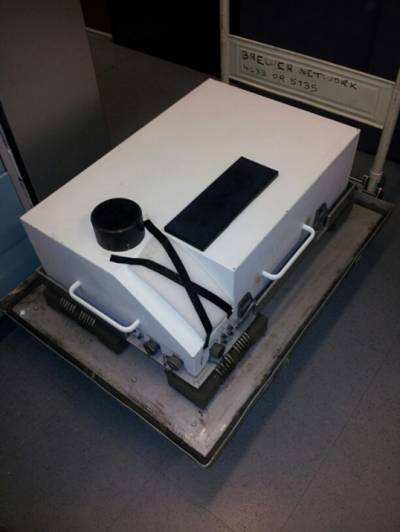 Remove the Brewer from the case by lifting from the two handles on either side of the brewer.
 - Place the Brewer on the ground or on a flat even surface.
- Remove the Brewer cover by undoing the four latches and lifting straight up.
- Remove the piece of foam over the control panel and place it in the zip-lock bag that was also at the control panel.
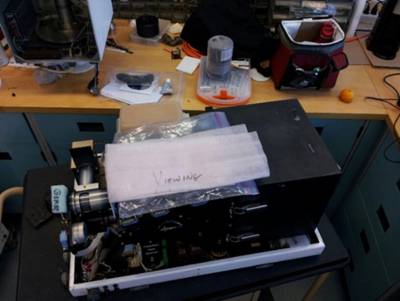
- Remove the piece of foam under the spectrometer case, between the spectrometer case and base or heat sink assembly and place it in the zip-lock bag.
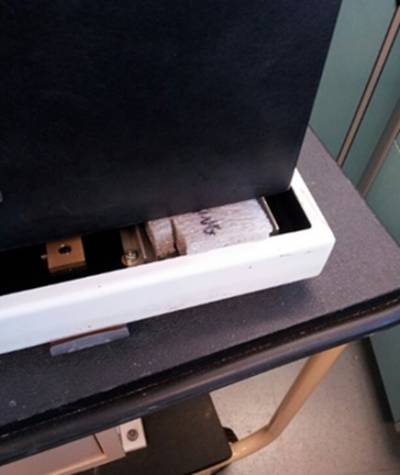
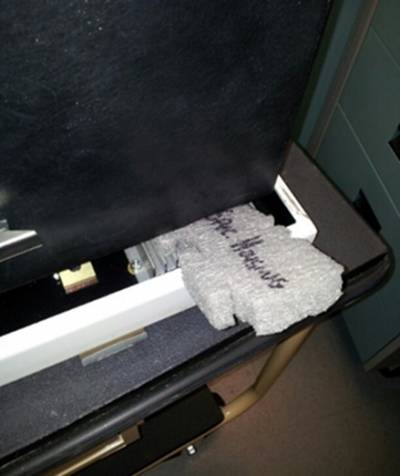
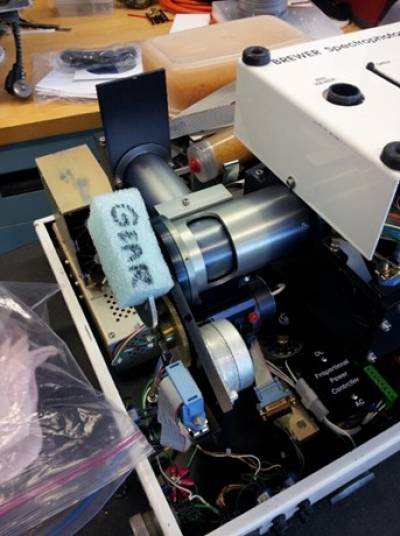
- Remove foam on the top part of the split-gear in the zenith drive and the foam on by the UV place it in the zip-lock bag.
- Put the Brewer cover back on the instrument and latch the four buckles.
- Remove the piece of foam over the zenith prism window and place it in the zip-lock bag.
- Put the zip-lock bag into the Brewer shipping case before storing.


Installing Brewer on tracker
Required tools: All required tools can be found in the red toolbox found with other Brewer supplies. - Hex driver – Size 25 - 4 #10-32 5/8 screws (will be shipped with Brewer)
1. Bring Brewer to tracker outside. Highly recommended, if possible, to use a cart to transport. If not possible, transport the Brewer by carrying with Two People. One person carrying from either handle. Be very careful as the instrument is fragile and heavy.
2. Place the Brewer on the tracker with the rubber feet on the bottom of the instrument lining up with the four-metal mounting tabs and the three bolts protruding from the top of the tracker will line up with holes on the bottom of the instrument. a. When placing the Brewer on the tracker the back of the instrument (side opposite the widow) is on the same side of the tracker that has the Plexiglas removable window. If there is no window on the tracker, line up the power button on the instrument with the power button on the tracker.
3. Secure the instrument to the tracker by taking the four screws and by hand threading them into the rubber feet of the Brewer. We highly recommend starting each of the four screws by hand to avoid cross threading and not tightening them down fully until each screw is started. This allows for easier installation of the mounting screws. Once all screws are started, use 25 Hex driver to secure the mounting screws.
4. Once the screws are installed connect the three cables coming from the tracker to the Brewer. Look at the end of the connectors and the receptacles on the Brewer as the cables can only be attached one way. Once the proper match is found screw in the connectors to the Brewer until tight.
Note: Outdoor connectors can accumulate oxidation, dirt, and grime. This can cause the screw in portion of the connector to feel tight when the cable isn’t fully connected. We have found the best method to ensure proper connection to be screwing the connector, then pushing the plug further into the receptacle and repeating until the connector can not be pushed any further and the threaded portion is hand tight.
5. Connect the connector cap from the brewer to the bulkhead cap from the Brewer to as demonstrated below with the chain wrapping around the outside of the cable.
6. Remove the UV Dome Cover from the instrument and power on the tracker and then the instrument. Contact the brewer network to let them know that the instrument has been set up. Brewer Packing 1. Go to computer of the Brewer that needs to be removed and select the software window running the Brewer. Press the ‘Home’ button on your keyboard to take the instrument out of schedule and once the screen reads that the brewer is not taking any measurements press CTRL + Scroll Lock.
2. Go to the instrument and turn off the Brewer by pressing the power button.
3. Remove the tracker cables. a. The protective caps will be linked together to protect their threads. Take the caps apart. b. Turn the outer portion of the connector closest to the Brewer. This disconnects the connector from the socket on the Brewer. The knurled portion closest to the 90-degree bend in the connector will disassemble the connector itself. The connector will disconnect from the Brewer easier if you turn the inner most ring until it butts up to the outer most ring, then wiggle the connector back out of the socket on the Brewer until restricted by the inner most ring. Repeat the process until fully disconnected and all connectors are removed.
4. Use the connector plug to cap the tracker data cable to prevent moisture entry into the tracker data cable and use the Brewer data cap to cover the data bulkhead on the Brewer. This will protect the threads and keep the contacts clean and dry.
5. Install the UV dome protector cap onto the UV dome.
6. Detach the Brewer from the tracker by removing the 4 bolts that thread up into the rubber Brewer feet. The Brewer is heavy and awkward, have someone help you move the Brewer to the area you will use for packing the Brewer. Note: The Brewer is very expensive ($250,000) and its optics can easily be damaged by rough handling. Please treat the instrument as the fragile scientific instrument that it is.
7. Affix the piece of stiff foam marked “Zenith Window” over the zenith prism window with electrical tape.
8. Remove the Brewer cover. Manually rotate the zenith prism down to the lamps by turning the brass combination gear mated to the small motor gear.
9. The piece of foam marked “Gear” has a split in it. Slide that piece of foam over the top part of the split-gear (upper most gear) in the zenith drive assembly to prevent the split gear from being damaged by impacting against the Brewer cover during travel.
10. Insert the piece of foam labelled “Under Spec. Housing”, between the spectrometer case and case base or the heat sink assembly if it is an older single Brewer.
11. Place the piece of foam Marked “Viewing Window” and the bag that contained all the foam over the control panel and filter wheels.
12. Use elastics to ensure the container of desiccant inside the instrument cannot open during shipping. Also secure the desiccant tray in place with elastics or cable ties to ensure the tray cannot move around during shipping. Replace the Brewer cover. Flip the Taps on the Brewer latches UP instead of down for shipping after they’ve been secured. 13. Un buckle the Brewer travel case and remove everything inside other than the 2 straps. Hang the two straps out over the edges of the case to create a +. 14. Place the brewer in the travel case and place the lose frame over the top of the Brewer.
15. Place one strap around the Brewer length-wise and the other width-wise to secure the Brewer between the frames. Secure straps at the strap buckles and place foam between buckles and lid to protect lid from rubbing buckles.
16. Put the Brewer Travel Case lid back on the instrument and latch it down. Attach the Shipping labels that came with the Brewer case over top of the old labels.