Table of Contents
Photon Counter Board
The photon counter board is used to count the intensity count coming from the PMT.


DB9 Connector
The DB9 Connector going from the PMT to the photon counter board
| DB9 Pin# Board | DB9 Pin# PMT | Use |
|---|---|---|
| 1 | 1 | Negative Signal A |
| 2 | 2 | Negative Signal B |
| 3 | 3 | Signal B |
| 4 | NC | NC |
| NC | 4 | +5V |
| 5 | 5 | Main Gate Inibit |
| 6 | 6 | Signal A |
| 7 | NC | NC |
| 8 | NC | NC |
| 9 | NC | NC |
| NC | 7 | Rate Meter Input |
| NC | 8 | Ground |
| NC | 9 | -8V |

Note:
- Pin 1/6 a twisted pair
- Pin 2/3 is a twisted pair
- Pin 2/3 twisted pair is the only signal wire that is actually used for counting, Pin 1/6 is not used
Testing The Board
Materials Required
- Oscilloscope
- Signal Generator
- Testing Jig (Optional, but see below)
Test Jig
The test jig can be made with a male to female DB9 connector with pin 1, 2, 3, 5 and 6 connected (1/6, 2/3 should be a twisted pair). Pin 2 and 3 should be easily disconnected with something like a wago or a terminal strip.
Example of test jig

Testing
Photon Counter Clock
- Turn off the brewer
- Disconnect the DB9 connector from the photon counter board
- Hook up one of your oscilloscope lead to pin 5 of the DB9 connector
- Turn on the brewer
- Wait for the instrument to start up with the shutter click (It it does not, you may have to start up dosbox on the computer)
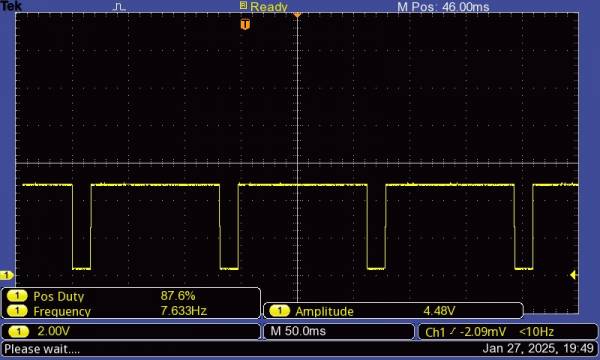
- The signal coming out of pin 5 of the harness which sets the clock for the PMT should be about 7.6Hgz at 87% positive duty cycle.

Photon Counter Counting
- Turn off the brewer
- Remove the db9 connector from the photon counter board
- Connect a signal generator to pin 1
- Inject 3.8VDC square wave at 10Khz
- In dosbox, enter MM
- run R,0,7,1;o. You should be getting about 13,000 counts across all 7 slits.
USER
R,0,7,1;O #With no lamps on and with the DB connector disconnected
0, 0, 0, 0, 0, 0, 0, 0
R,0,7,1;O #with injecting a 3.8VDC square wave at 10KHz onto pin 3
2651, 2726, 2715, 2661, 2708, 2581, 2630, 2756
