
linux
Table of Contents
Linux - Additional Tricks and Tips
WINE
- Not the drinking kind…
Comports setting Method 1 (regedit)
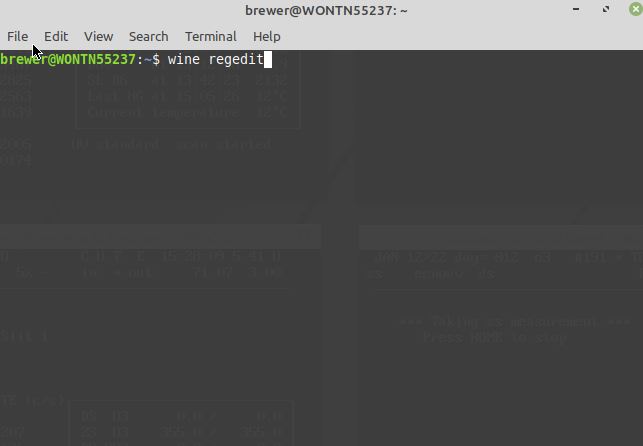
- Go to regedit via
- Terminal
wine regedit
Navigate to /HKEY_Local_Machine/Software/Wine/Ports and add a new string called com1.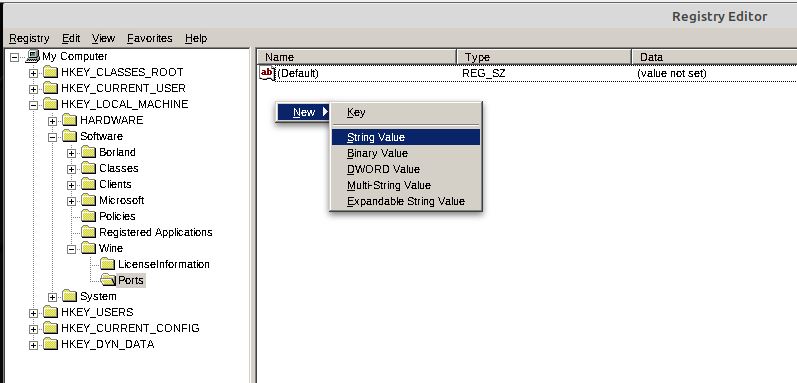
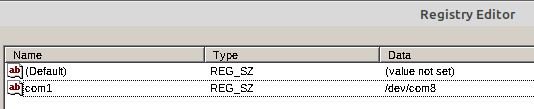
Set the data to the comport (I.E. /dev/ttyUSB0)


Comports setting Method 2 (terminal)
run the following command in terminal
- sh
sudo rm ~/.wine/dosdevices/com1 && sudo ln -s /dev/com6 ~/.wine/dosdevices/com1
Ensure you replace com6 with what ever com port you want to use (com7, ttyUSB0 and etc)
How to associate .exe files with Wine on Ubuntu?
You need to install wine-binfmt.
Also copy wine.desktop to /usr/share/applications or to $HOME/.local/share/applications/. You will find wine.desktop in /usr/share/doc/wine/examples/wine.desktop.
None of the windows/notepads are responding
Sometimes Gnome (desktop interface) has some issue, simply go and restart gnome by doing the following
On the desktop, press Alt + F2. A text box will pop up, type R and press Enter Gnome will then restart and things should work again.
linux.txt · Last modified: 2024/12/31 23:02 by 127.0.0.1