
Table of Contents
High Voltage Test (HV)
The high voltage test is used to determine the PMT response depending on the voltage provided to it. Upon entering the HV command, you will be prompted with the following.
High Voltage Test (SB¹)
The HV command invokes a test used to determine the optimum high voltage setting for the photomultiplier. The instrument has to be properly setup before the test is run, to do this jumper J2 on the high voltage module must be moved from Pins 2-3 to Pins 1-2 after the Brewer power is turned off (Ref - Appendix F). The instrument power must be turned back on to perform the HV test. After the test is performed the brewer power must again be turned off and the jumper J2 on the high voltage module must be returned from Pins 1-2 back to Pins 2-3, and then the power restored for normal operation. The HV command starts an automatic high voltage test and writes the results to HVJJJYY.III.
| Operating Position | HV Test Position |
|---|---|
 |  |
The HVSET command can then be used to set the High Voltage. Alternately, after the instrument is returned to normal operation, an adjustment can be made while monitoring the high voltage during multiple AP tests.
This test is normally used in the factory during the final set-up stages of manufacture, or in the field if it is suspected that the setting is not correct. The Standard Lamp is turned on, the iris is opened, FW#1 is put to position 1, and FW#2 is set to position 0.
See the HVSET command, and Appendix F for more details on the HV test.
High Voltage Test (MB²)
- Ensure the instrument is able to run diagnostic data (As it still required to measure the SL Bulb)
- Turn the instrument off
- Take the lid off the Brewer.
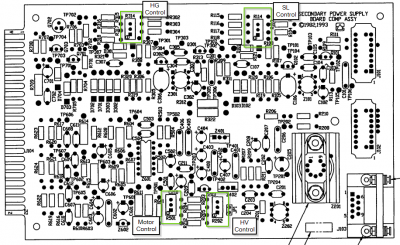
- Take the cover off the Secondary power supply
- Turn the brewer on
- Run the command “HVB” in dosbox
- Follow the dosbox prompt (See Suggested Values for more info)
- During the lamp warm up, set the multimeter to the voltage setting, and insert the leads to GND and HV on the panel beside the secondary power supply
- Once the lamp has warmed up and is waiting for the high voltage to be set, adjust the R202 pot until you are at the correct voltage - Refer to the table below for more info. Press the top left sighting button to when you have set the voltage.
- The Iris will move to the from the middle to the open position, then back to the middle, Once it is at the middle you may proceed to next voltage
- Repeat until you have completed the High voltage test

Note: Prior to version 7.33, to run a high voltage test for multiboard electronics, you will need to use the HVB command instead.
Suggested Values
| Description | Suggested values | |
|---|---|---|
| Photomultiplier serial Number: | Enter the brewer serial number | IE: 046 |
| Preame Voltage level | Enter the discriminator (PMT) voltage | 52mm PMT are typically around -30mV, where as 22mm PMT are usually around -10mV |
| Min Voltage | Where to start measuring the high voltage test from | For MB², usually around -900~-1000v. SB¹ will indicate it's measuring range, use somewhere above the minimal range. |
| Max Voltage | Where to end the high voltage test at | For MV, usually around -1700. SB¹ will indicate it's measuring range, use just below the the maximum range. |
| Increment | Increment per level | For MB², 50, for SB¹, 25 |
| High Voltage(V) | Measured Voltage(V) |
|---|---|
| 900 | -4.5 |
| 950 | -4.75 |
| 1000 | -5.00 |
| 1050 | -5.20 |
| 1100 | -5.50 |
| 1150 | -5.75 |
| 1200 | -6.00 |
| 1250 | -6.25 |
| 1300 | -6.50 |
| 1350 | -6.75 |
| 1400 | -7.00 |
| 1450 | -7.25 |
| 1500 | -7.50 |
| 1550 | -7.75 |
| 1600 | -8.00 |
| 1650 | -8.25 |
| 1700 | -8.50 |
| 1750 | -8.75 |
| 1800 | -9.00 |
Notes
SB¹ - Indicates Single board electronics
MB² - Indicates Multi-board electronics